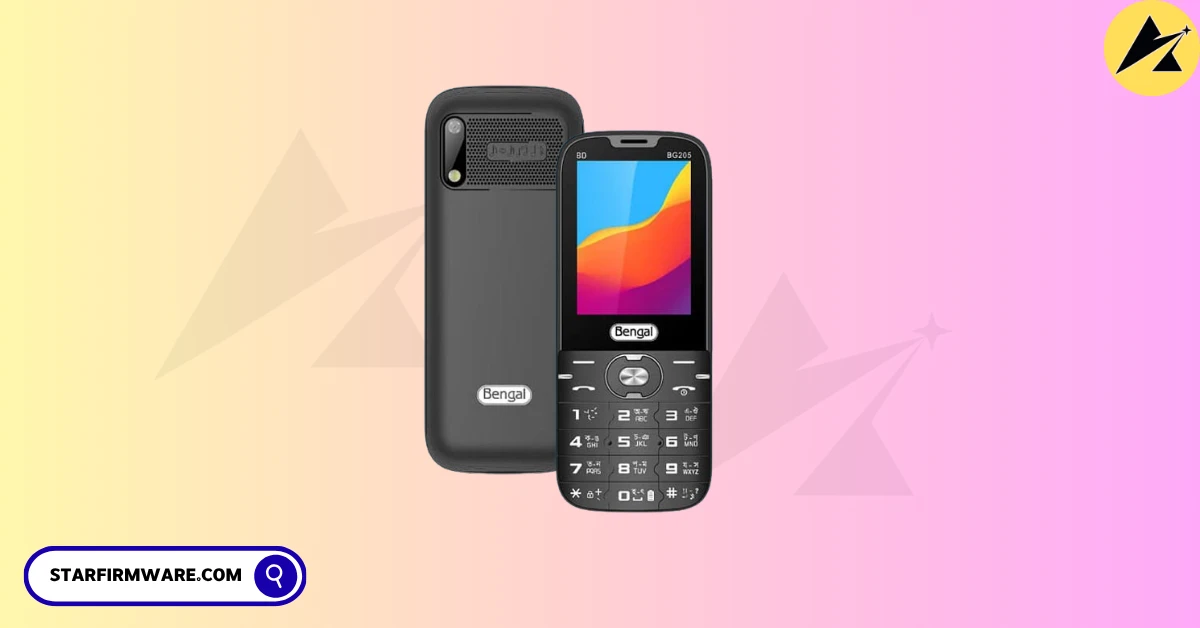

Honorable visitor, are you searching for the Bengal BG205 BD Flash File? You’ve come to the right place. Here is a link to gather all the materials to install the stock firmware. For example, all the information including the flash tool, USB drivers, and flashing guide are clearly mentioned. So that you can understand everything about it before downloading the Bengal BG205 BD Flash File. Follow the paragraphs below for details.
Bengal BG205 BD were launched in the year 2025. The cell phone came out of the box with a SpreadTrum chipset. After taking this device, some users were facing software related problems. For the mobile device software-related issues are common. Instead, it is a simple minor issue on your device, so no tension. So, here’s everything you need to know about fixing the Bengal BG205 BD firmware related problems using the troubleshooting strategies mentioned below.
The Bengal BG205 BD Flash File, you can use it to fix almost all the software related problems to your mobile device. Such as: Dead Mode Recovery, Hang LCD, Black or White Display, Re-install, Downgrade, Upgrade, Pin Code Remove, Privacy Code Unlock, Password Unlock, Repair IMEI, Full Flash after Hardware Change etc.
Overview
We are scanning it with a powerful Antivirus to ensure security issues, after saving it by reading from a new mobile phone with the Chinese Miracle (CM2) update tool. Also, we have provided our website after testing by our skilled technicians. So you can download and use our Bengal BG205 BD Flash File without any doubt. Hopefully the desired result awaits you.
Firmware Advantage
- Fix dead recovery issue
- Update after change CPU/ic
- Fix LCD screen
- Fix graphics issues
- Re-flash the stock firmware
- Unbrick Stock Firmware
- Fix boot loops issues
- Upgrade or downgrade issues
- Fix network issues
- Root/unroot your device to fix bugs
- Unlock your mobile phone
- Resolve Hang Logo issue
- Key disable software issue
- Restore device warranty
The Bengal BG205 BD Flash File helps to you solve all the software issues.
Download Bengal BG205 BD Flash File (Stock Firmware)
Here is a direct link to download Bengal BG205 BD Flash File (Stock Firmware). From which you can easily download your desired flash file. But yes, before downloading, read all the information part of the stock ROM carefully.
Firmware Details
| Firmware Name | Bengal BG205 BD |
| Hardware | SpreadTrum |
| Chipset/ic | SC6531E |
| File Type | BIN |
| File Size | 4MB |
| Download Type | RAR/ZIP |
| Boot Key | Call key |
| Supported Tool | Chinese Miracle and Others |
| Firmware Status | 100% Tested |
Please Attention: Before download the Bengal BG205 BD Flash File on your device, please re-check again the software version of above firmware details” section and mobile photos. If you are sure it’s perfect for your device, then you can download and install this firmware package without any hassle.
Remember: Once accepted, it will no longer be considered refundable.
Read Also: All Keypad Phone Flash File (Stock Firmware)
How to Flash
You can flash with any box device tool in the Bengal BG205 BD flash file. If you don’t know how to install or flash firmware files or you don’t have the tools, you can easily follow our rules without any kind of device. See the requirements section to find all the things you need.
Re-require
- A Windows PC or laptop.
- An advanced quality USB cable.
- A USB driver software that will help connect Windows and mobile devices.
- A flash tool for Windows compatibility.
Steps to Install
In this guide, I will show you the steps to install the Stock Firmware on your Bengal BG205 BD mobile device. These include the option to flash, repair, re-install, unlock, remove, dead mode, downgrade, upgrade, and others, Likewise, you could also choose from the options.
However, in some illustration, it might face a few issues which in process will be incomplete to flash the device. But on the plus side, there exists a handy procedure to install the flash file on your Bengal BG205 BD device. Let’s start with how it could be achieved.
- Download and extract the Bengal BG205 BD Flash File on your PC ready for install.
- Install USB drivers on your windows.
- After installing, open the Flash Tool on your Windows PC.
- Go to the Flash section on your tool.
- Click to check the mark on WRITE.
- Next select the chipset model SC6533/SC6531.
- Now click on the WRITE FLASH tab. (If you use the Miracle tool, press the START button).
- Click and Hold boot key on mobile keypad (No want to use Miracle Boot JIG).
- Connect your mobile device to the PC via USB cable.
Now! Your firmware installing process has started, wait until it is finished flash.
Flash Note
- Before installing the Bengal BG205 BD Flash File (Stock ROM) take a complete backup of the Firmware and personal Data of your device. However all data will be erased or deleted by flashing the firmware.
- The mobile phone company officially releases the mobile device and Stock firmware. It helps to recover the mobile phone device, for example, Unlock bootloop, Privacy Lock, Dead Recovery, Remove Hang Starting Logo, and any of the Software issues.
- Your device should be at least 70% charged so that it doesn’t accidentally turn off during the firmware installation process.
- Also, if you have any more questions regarding flashing this phone, please let us know in the comments, we will try to provide an easy answer. <—– InshaAllah—–>
Reboot the Phone
It is very important to reboot the device once the firmware installation is complete, as it replaces the Bengal BG205 BD firmware files and prepares it for reactivation. Network issues can occur after installing a stock ROM and can be caused by corrupted cache, default apps, bootloader errors, etc. Sometimes, you may need to turn off the phone and leave it idle for a few minutes and then turn it back on. It may take a few seconds for the phone to immediately connect to the available network and activate basic functions. It turns out that rebooting the device can also help in this case.
Conclusion
If you follow all the rules I have shown, you can easily flash without any box. Inshallah.
However, if you want to know more or you can comment on any problem. I will try to reply as soon as possible. Thank you.